

How-to guide
How to optimize for AI search: a step-by-step technical and content guide
Knowing how to optimize for AI search means preparing your site for engines that read pages, combine them and answer in their own words, often with only a few links. This guide is for marketing leads and the developers who work with them, and it goes engine by engine: which crawler to allow, how to check it in logs, how to structure pages, how to build consistent brand facts and how to measure the result.
Get a free AEO visibility check
Two lines is enough. A specialist replies within one business day.
Quick answer
How do I optimize my website for AI search engines?
Here is how to optimize for AI search in five steps: allow the search crawlers each engine uses, serve main content as server-rendered HTML, restructure key pages answer-first under question headings, make brand facts consistent across your site and trusted profiles, and measure a fixed prompt set alongside Search Console, Bing Webmaster Tools and GA4 referrals.
- Each AI engine has its own search crawler token; allow those and decide training separately.
- Pages that only render in JavaScript or sit behind a CDN block cannot be quoted.
- Consistent brand facts across Wikipedia, review sites and schema reduce wrong answers.
- First-party reports from Google and Bing now show AI citations for free.
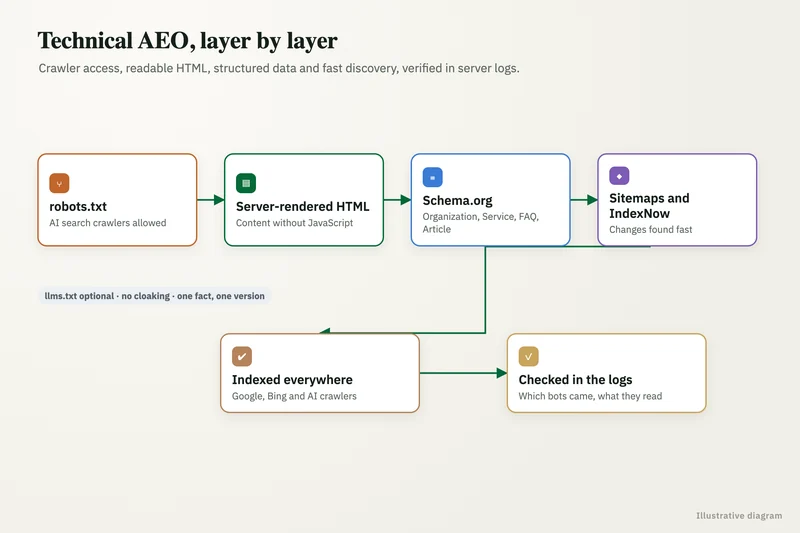
How to optimize for AI search: what does it actually involve?
It means making your pages easy for answer engines to fetch, understand and cite, and making sure what other sites say about you is accurate. The work overlaps heavily with SEO; Google's AI optimization guide says optimizing for generative AI search is still SEO.
The difference is in what wins the click. Pew Research found that users clicked a result on 8% of visits that showed an AI summary, against 15% without one. When fewer people click, being the source the answer is built from matters more than holding a blue link below it. And the answer engines are large in their own right: TechCrunch reported in February 2026 that ChatGPT had 900 million weekly active users.
In practice the work splits into five steps, covered below in the order we run them: crawler access, readable pages, answer-first content, consistent brand facts and measurement. The first two are mostly technical and sit with whoever runs the website and CDN. The third is editorial. The fourth spans marketing, PR and whoever manages review profiles. The fifth needs one owner who runs the same prompts every month and reports what changed.
Which AI search engines should you optimize for?
Cover the engines your buyers use, which for most businesses means Google AI Overviews and AI Mode, ChatGPT, Perplexity, Microsoft Copilot and Gemini, with Claude growing. Each has a crawler you can check and a way to measure.
The table lists the crawler token that controls search visibility for each engine, the separate training token, and where to measure. Training and search are different decisions; blocking a training crawler does not remove you from answers.
If budget is tight, weight the engines by where your buyers already are. Check GA4 for existing referrals from each engine, ask new leads how they found you, and look at Bing's share of search in your markets before deciding how much effort Copilot deserves. Smaller engines can share most of the same work, since good crawler access and clear pages help every engine at once.
| Engine | Search or answer crawler | Training control | Where to measure |
|---|---|---|---|
| Google AI Overviews and AI Mode | Googlebot | Google-Extended (Gemini only) | Search Console generative AI report |
| ChatGPT search | OAI-SearchBot | GPTBot | GA4 referrals from chatgpt.com; prompt set |
| Perplexity | PerplexityBot | Not used for training, per Perplexity | GA4 referrals from perplexity.ai; prompt set |
| Microsoft Copilot | Bingbot | No separate Copilot crawler | Bing Webmaster Tools AI Performance |
| Gemini app | Googlebot for Search | Google-Extended | GA4 referrals from gemini.google.com |
| Claude | Claude-SearchBot | ClaudeBot | Prompt set; GA4 referrals |
Step 1: how do you check AI crawler access?
Read your robots.txt, your CDN or firewall bot settings and your server logs, in that order. All three can block an engine, and only the logs prove a crawler is actually getting your pages.
In robots.txt, make sure OAI-SearchBot, PerplexityBot, Claude-SearchBot, Bingbot and Googlebot are not disallowed. OpenAI says robots.txt changes for OAI-SearchBot take about 24 hours to apply, and that sites opting out are not shown in ChatGPT search answers. Then check Cloudflare: it changed its default in July 2025 to block AI crawlers unless they pay, and its managed robots.txt can add rules you did not write yourself.
Finally, filter server or CDN logs by user agent and look for HTTP 200 responses on priority URLs. If a search crawler is getting 403 or 402 responses, fix that before touching content. Note that user-triggered fetchers such as ChatGPT-User and Perplexity-User behave differently and may not follow robots.txt.
Step 2: how do you make pages readable for AI engines?
Serve the main content, including answers, tables and FAQs, in the initial HTML response rather than loading it with JavaScript. Then make sure every priority page is indexed in both Google and Bing.
Check rendering with Search Console's URL Inspection and by viewing the page source. Keep an accurate XML sitemap, submit it in both Search Console and Bing Webmaster Tools, and use IndexNow to tell Bing about changes quickly, since Bingbot does the crawling for Copilot. Make sure canonical tags point to the page you want cited; a mismatch can leave the engine quoting a different URL or none at all.
If your site sits on a JavaScript framework, ask the developers whether pages are server-rendered or statically generated. Single-page apps that fetch content after load are the most common reason a page looks fine to people and empty to crawlers.
Step 3: how should you restructure content for AI answers?
Rewrite headings as the questions buyers ask and open each section with a direct answer. Put evidence, numbers and named sources right after it.
Engines often break a prompt into several searches before answering, which Google calls query fan-out, so pages with clearly separated sub-answers give them more to work with. Google also says there is no need to break pages into tiny pieces. Use comparison tables where buyers weigh options, numbered steps for processes, a visible last-updated date, and an FAQ block whose answers stand alone. Say who the page is for and where the facts apply, such as country, plan or product version.
- One question per heading, answered in the first one or two sentences.
- Figures with the source named in the same sentence.
- Tables for comparisons, numbered lists for steps.
- A dated, standalone FAQ block at the end.
Step 4: how do you build consistent brand facts and mentions?
Make the facts about your company identical everywhere engines look: your site, Organization schema with sameAs links, Wikidata and Wikipedia where you qualify, LinkedIn, review sites such as G2, Capterra or Yelp, and Google Business Profile. Conflicting facts are a common cause of wrong AI answers.
Then earn mentions where your buyers ask questions, including Reddit, YouTube, industry press and review platforms. Rank alone does not explain citations: Ahrefs found only 12% of URLs cited by AI assistants rank in Google's top 10 for the original prompt. Keep all of it genuine. Google's guide advises against inauthentic mentions, and fake or incentivized reviews break consumer rules in the US, UK and elsewhere.
Step 5: how do you measure AI search optimization?
Run a fixed prompt set in each engine every month and record mentions, citations and accuracy, then add the first-party reports. That combination shows both what engines say and what traffic follows.
Search Console added generative AI performance reports in June 2026. Bing Webmaster Tools AI Performance shows Copilot citations, cited pages and grounding queries, and added citation share in June 2026. In GA4, create a channel group for chatgpt.com, perplexity.ai, copilot.microsoft.com and gemini.google.com referrals and track their conversions. Paid tools add daily tracking across engines if you need it.
Write down the baseline before the first change ships. Without it, a rise in AI referrals could just as easily come from a seasonal swing or a competitor's site going down.
How long does it take to optimize for AI search?
Access and rendering fixes take days to weeks; content and mention work shows across months. Plan in quarters, not sprints.
Answers also vary between runs and change as engines update, so a single good or bad answer tells you little. Judge progress on the monthly trend in citation share and AI referrals against your baseline. Anyone who promises a specific citation or position by a date is guessing; no one can promise a citation.
A realistic plan front-loads the technical checks in the first month, rewrites priority pages over the next two, and runs mention work continuously after that.
What are the most common AI search optimization mistakes?
Most mistakes come from treating AI search as a separate trick rather than as SEO plus a few specific checks. These are the ones we see most in audits.
- Blocking every AI bot at the CDN, including the search crawlers.
- Assuming blocking GPTBot removes you from ChatGPT search; it only affects training.
- Spending the budget on llms.txt or schema while pages render in JavaScript.
- Measuring only Google rankings and ignoring Bing, which feeds Copilot.
- Publishing self-ranking best-of lists or scaled alternatives pages.
- Letting brand facts drift out of date across profiles and directories.
FAQ
Frequently asked questions
What is the first step in optimizing a site for AI search?
Check crawler access. Confirm robots.txt, Cloudflare or firewall settings and server logs allow Googlebot, Bingbot, OAI-SearchBot, PerplexityBot and Claude-SearchBot to fetch your key pages. Content work cannot help a page the engines cannot reach.
Is optimizing for AI search different from SEO?
It builds on SEO rather than replacing it; Google says optimizing for generative AI search is still SEO. The additions are AI crawler decisions, answer-first structure, entity consistency across third-party profiles and measurement by prompt set and AI referrals.
Do I need llms.txt to optimize for AI search?
No. No major answer engine has confirmed using llms.txt, and Google's John Mueller compared it to the meta keywords tag. It is cheap to publish and can help coding agents read developer docs, but it is not a citation lever.
Does Bing matter for AI search optimization?
Yes. Bingbot does the crawling for Microsoft Copilot, and Bing Webmaster Tools AI Performance is one of the few free reports showing AI citations and citation share. Verify your site there and use IndexNow to notify Bing of changes.
How do I see traffic from AI search in GA4?
Look at referral sources such as chatgpt.com, perplexity.ai, copilot.microsoft.com and gemini.google.com, and group them into a custom channel so you can track sessions and conversions together. AI Overview clicks appear as Google organic traffic instead.
Keep reading
Related pages
Get started
Find out what AI says about you
Send your website and three questions your buyers ask. Within one business day we reply with how ChatGPT, Google AI Overviews and Perplexity answer them today, who they cite instead of you, and a fixed-price plan.
- Free AEO visibility check
- Fixed quote before any work starts
- Measured on citations and AI referrals, not promises
Prefer email? info@aeoservicesagency.com
Get a free AEO visibility check
Two lines is enough to start.